FurMark
Current Version: 1.8.2
»FurMark homepage
»FurMark 1.8.x Submissions
»Benchmark Submissions

GPU Caps Viewer
Current Version: 1.9.0
»GPU Caps Viewer homepage
»GPU DB Submissions

PhysX FluidMark
Current Version: 1.2.0
»FluidMark homepage
»FluidMark 1.2.x Submissions
»Benchmark Submissions

GeeXLab
Current Version: 0.2.0
»GeeXLab homepage
»GeeXLab Overview

GPU Shark
Current Version: 0.2.3
»GPU Shark homepage

TessMark
Current Version: 0.2.0
»TessMark homepage

Blogs
»JeGX's Infamous Lab


PhysX FluidMark - OpenGL Benchmark - Fluid Simulation

PhysX FluidMark

NVIDIA PhysX and OpenGL Benchmark with Multi-Core CPU Support


» Back To Benchmarks Index


» Download
» What is PhysX FluidMark?
» ChangeLog


Download


FluidMark 1.2.0 - Windows XP / Vista / Seven 32-bit (2010.05.21)


Old Versions:

The forum for scores or bug report, is here:
Benchmarking @ oZone3D.Net Forums


FluidMark Related News


PhysX FluidMark has been successfully tested on the following systems:
  • Core i7 960 / 12GB DDR3 / Windows 7 64-bit / NVIDIA GeForce GTX 260 / Forceware 197.45 / PhysX 9.10.0129
  • Core 2 Duo E8400 / 2048M DDR3 / Windows 7 64-bit / GeForce GTX 480 / ForceWare 197.75 / PhysX 9.10.0129
  • Core 2 Duo E8400 / 2048M DDR3 / Windows 7 64-bit / Radeon HD 5870 / Catalyst 10.4 / PhysX 9.10.0129


PhysX FluidMark is a freeware, it cannot be sold or rented. You can copy it and distribute it freely. In case of distribution (CDROM, ...), just send a little email to jegx[AT]ozone3d[DOT]net and add [PHYSX-FLUIDMARK] to the mail subject.


What is FluidMark?

PhysX FluidMark is a physics benchmark based on NVIDIA PhysX engine. This benchmark performs a fluid simulation using SPH (Smoothed Particle Hydrodynamics) algorithm to increase the realism of the fluid. FluidMark supports GPU PhysX (NVIDIA GeForce 8+ only) as well as multi-core CPU PhysX.

This benchmark exploits OpenGL for graphics acceleration and requires an OpenGL 2.0 compliant graphics card: NVIDIA GeForce 5/6/7/8/9/GTX200 (and higher), AMD/ATI Radeon 9600+, 1k/2k/3k/4k (and higher) or a S3 Graphics Chrome 400 series.

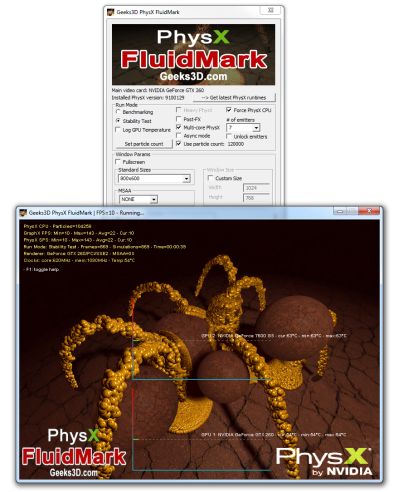
The startup interface allows you to tweak the benchmark features such as:

  • GPU or CPU PhysX
  • Multi-Core CPU PhysX support
  • Benchmark mode or stability test / interactive mode. Interactive mode makes it possible to move the camera (mouse) and to pause PhysX engine (with P key).
  • Fullscreen or windowed for each type of run mode
  • Window size selection (standard or custom)
  • MSAA samples selection
  • Benchmarking parameters: time based or frames based
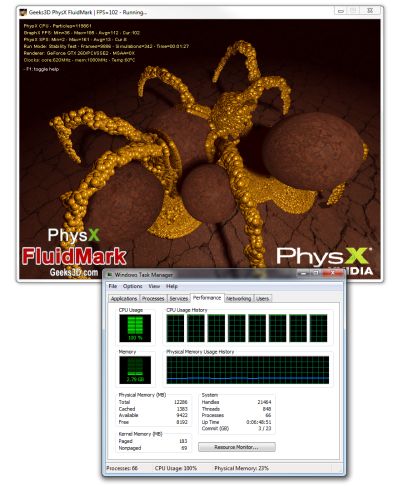
Multi-core CPU PhysX
Multi-core CPU PhysX in action: a fully loaded 8-core CPU!



ChangeLog


Version 1.1.0 - July 22, 2009
Version 1.0.0 - August 10, 2008
  • First release!


Language:

3D Graphics Search Engine:

The Geeks Of 3D


Geeks3D's Articles
»GPU Memory Speed Demystified

»Multi-Threading Programming Resources

»GeForce and Radeon OpenCL Overview

»How to Get your Multi-core CPU Busy at 100%

»How To Make a VGA Dummy Plug

»Night Vision Post Processing Filter


Geeks3D latest news

Demoniak3D
Current Version: 1.23.0
»Demoniak3D
»Download
»Libraries and Plugins
»Demos
»Online Help - Reference Guide
»Codes Samples


Misc
»Texture DataPack #1
»Asus Silent Knight CPU Cooler
Page generated in 0.046618938446045 seconds.